PingBot SMS - GPS Tracker
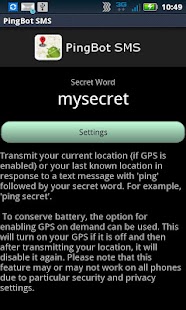
GPS Tracker (aka PingBot) listens for incoming SMS/Text messages looking for the keyword ping followed by your secret word.
Once it receives the proper command, it returns a link with your current location to the sender.
Simply install the PingBot SMS on your phone.
Give people your secret word (you can change it any time you want if they abuse it).
When they want to know where you are, rather than calling, they text you with a ping ("ping secretword") and they will receive back a map location of where you are.
If your GPS is off, it will attempt to enable it, determine your location, send it back as a text message, then turn off your GPS again.
Perfect when you dont want to drain your battery with GPS enabled constantly.
Unlike other mobile security products, PingBot SMS requires the least access your phone.
It only requires the ability to receive SMS messages (to scan incoming messages for the ping and secret word), the ability to gather your GPS location, and then send it via SMS.
There is no external service to sign up for; no need to visit a website to track a phone.
No unnecessary battery drain from continuously transmitting your location, even when not needed.
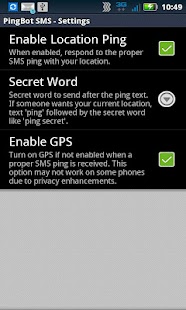
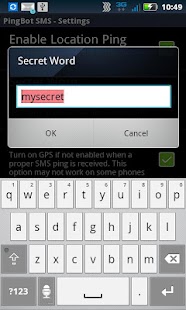
Your settings allow you to decide when PingBot is enabled and listening, to turn on your GPS if off, and change your secret word.
How are people using PingBot SMS?
- Honey, where are you?- Have you left work yet?- Track your kids even when 3G isnt available (SMS is much more reliable)- Lost your phone, ping it!
Send yours location through Text Messaging.
Easy to use, easy to setup.
No ads!
No spyware.
Your location is ONLY sent to the sender who has your secret word.
No external service to subscribe to.
About PingBot SMS - GPS Tracker
- Package name (App ID)
- net.melwin.pingbot
- Available on
- Google Play
- Price
- Free
- Version
- v1.2
Looking for the PingBot SMS - GPS Tracker APK?
The safest way to get PingBot SMS - GPS Tracker (net.melwin.pingbot) on your Android device is to install it directly from Google Play — you'll always get the latest official version, automatic updates, and no risk of modified or infected APK files from third-party sites.
Weather Features
Get accurate weather forecasts and real-time updates.
Fitness Tracking
Track your workouts and monitor your health metrics.
Productivity Tools
Boost your productivity with powerful tools and features.
See PingBot SMS - GPS Tracker in Action
Frequently Asked Questions
Is PingBot SMS - GPS Tracker free?
Yes, PingBot SMS - GPS Tracker is free to download and install on Android through Google Play.
How do I install PingBot SMS - GPS Tracker on Android?
Open Google Play on your Android phone or tablet, search for PingBot SMS - GPS Tracker or tap the Google Play button on this page, then tap Install. The app downloads and installs automatically.
What is net.melwin.pingbot?
net.melwin.pingbot is the App ID (package name) of PingBot SMS - GPS Tracker on Google Play. Every Android app has a unique package name, and it is the safest way to verify you are installing the official app.
Is PingBot SMS - GPS Tracker safe to download?
Installing PingBot SMS - GPS Tracker from Google Play is the safest option: you get the official version, verified by Google Play Protect, with automatic updates. Avoid APK files from unofficial third-party sites.
Get PingBot SMS - GPS Tracker Today
PingBot SMS - GPS Tracker for Android — free download on Google Play.
Compatible with Android phones and tablets — available on Google Play.
Ask AI about this app
Get instant answers about features, tips and more from popular AI assistants.